Welcome to Marza, nizar5016@gmail.com

4 simple steps to start selling

0/4 completed

You're 4/4 steps away from making your first sale.

1

Connect your store to sync orders automatically.

Pending

Create and publish your first product listing.

Pending

Publish products to your store and start selling.

Pending

Order a sample and validate your workflow.

Pending

All set? Here's what's next

Complete these steps to unlock the full Marza experience.

Payments Set up your billing method to enable automatic payments.
Information Add your company details for invoicing and business account setup.
Branding Customize your branding to make your products truly your own.

Orders

Track fulfillment, shipping and customer issues in one place.

Orders requiring action 0 Loading live orders…
In production 0 Loading live orders…
Shipped this week 0 Loading live orders…
Refunded 0 Loading live orders…
Order Customer Items Status Total Store Created
Loading live orders…

My Products

Drafts saved from your customiser, synced from Cloudflare.

Loading drafts...
Product
Information
Details
Brandings
Action

Wallet

Manage your funds, payments, and transactions

Total Balance 0.00 MAD
↗ 0.0%
Available 0.00 MAD
Pending 0.00 MAD
On Hold 0.00 MAD

Quick Actions

Billing Currency

Set your preferred currency for all charges and payouts

ⓘ All future transactions, product costs, and payouts will be processed in Moroccan Dirham.

$ +0.0%
Total Earnings
0.00 MAD
+0.0%
This Month
0.00 MAD
-0.0%
Withdrawals
0.00 MAD
+0 new
Active Orders
0

Payment Methods

Primary
Mock Wallet Profile A
Card-like top-up flow
Demo only
Mock Wallet Profile B
Backup payment method
Demo only
Mock Payout Profile
Bank transfer style payout
Demo only

Transaction History

Coupon Manager

Create and manage discount coupons

SUMMER2026 Active
Discount20% off
Used145 / 500
Expires31/08/2026
FREESHIP Active
Discount$10 off
Used89 / 200
Expires30/06/2026
WELCOME25 Expired
Discount25% off
Used500 / 500
Expires20/02/2026
FIRST10 Active
Discount$10 off
Used12
Expires31/12/2026

Add Money

Top up your wallet balance

Add Funds

Choose an amount and payment method

1 Amount
2 Payment

Select Amount

Funds will be available immediately after payment confirmation

Withdraw Money

Move your wallet balance out

Withdraw Funds

Choose an amount and payout method

1 Amount
2 Payout

Select Amount

Withdrawal requests are saved immediately and can be reviewed in your wallet activity

Billing History

Review all wallet payments, payouts, and order-related credits

Transaction Type Status Date Amount

Payment Methods

Review the methods your store can use for wallet top-ups and payouts

Setup Flow

Select a payment method first, then fill the matching details below.

Supported Wallet Flows

Credit / Debit Card-form checkout flow for mock wallet top-ups
Wallet Internal balance-style payment method for store payments
Mobile banking / E-Banking Bank transfer via Fatourati or banking app instructions
Wafacash Agency-based cash transfer method in the Morocco flow

Branding

Build a consistent brand experience across labels, packaging and inserts.
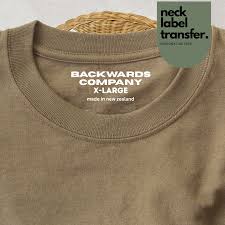
Custom neck label preview

Custom neck labels

Add your brand inside every garment.

  • Upload logo + size guide
  • Choose print position
  • Preview before publishing

Pack-ins & thank-you cards

Include cards, QR codes and promo inserts.

  • Personalized messages
  • Coupon tracking
  • Country-specific variants

Branded packaging

Strengthen unboxing with your own packaging style.

  • Mailer design presets
  • Color and logo control
  • Cost estimate by region

Brand assets checklist

Logo filesSVG preferred, PNG fallback
Brand colorsPrimary, secondary, neutral set
Tone & messagingShort tagline and thank-you copy

Store Settings

Configure your store defaults, address, publishing and brand options.

Store name

Your store name will be shown on the ship from field on shipping labels

Order Settings

Choose when and how orders are submitted for your store. Any changes made here will apply to future orders (not already submitted orders).

i All manual, sample, bulk, and orders with personalizable products must be submitted manually (regardless of settings below).

Choose when and how personalized orders are submitted for your store. Any changes made here will apply to future personalized orders.

i All personalized orders with missing or invalid customization fields can be routed to manual review (regardless of settings below).

Choose how often you would like to receive tracking information.

i Settings only apply to Manual and Sample orders.

Due to shipping restrictions from some print providers and carriers orders that cannot be delivered or have delayed delivery status are set on hold. You can send delayed orders to production manually or enable automated sending to production.

We'll send you daily emails with updates on your orders and their production status.

Ship From Address

Selling Region

Choose where you want your store to sell and ship orders.

Available regions:

Ship From Address

Choose which address is used for shipping labels and order communication.

Marza Fulfillment Center, Casablanca, Morocco will be used for shipping labels.

Publishing Preferences

Marketplace Products

Choose which catalog products artists are allowed to use in the marketplace.

0 enabled

Branding

Gift Messages

Pack-ins & thank-you cards

Set up inserts, messages, and targeting rules for your shipments.

Thank You Cards

Coupons and Discount Vouchers

Stickers and Decals

Saved Designs

Saved designs grouped by Thank You Cards, Stickers and Coupon Codes.

Loading saved designs...

Shipping

No saved thank-you card designs yet.

Stickers and Decals

No saved sticker designs yet.

Coupons and Discount Vouchers

No saved coupon designs yet.

Analytics Dashboard

Track your POD business performance

Total Revenue DH
0.00 MAD

No revenue yet

Total Orders 🛒
0

No orders yet

Fulfillment Rate
0.0%

No fulfilled orders yet

Active Customers 👥
0

No customers yet

Products Sold 📦
0

No products sold yet

Avg Order Value DH
0.00 MAD

No average yet

Revenue & Orders Overview

Track your revenue and order trends over time

Revenue Orders

Geographic Distribution

Sales by city in Morocco

  • No location data yet

Product Performance

Detailed view of your real product sales for the selected period

Product Category Orders Units Sold Revenue Avg Order Value Last Sale
No product performance data yet.

Recent Orders

Latest transactions from your store

Order ID Customer Products Items Total Status Date Action
No recent orders yet.

Top Products by Revenue

Your best performing products this month

No top products yet
0 MAD

Developer

Manage API keys, webhooks, and integration settings.

Developer Tools

Developer configuration will appear here.

Create order

1 Product
2 Consumer
3 Shipping
4 Payment
Products

Choose one of your saved product designs to start this order.

Order #MZ-10421

In production Feb 13, 2026
Customer
Name
Email
Phone
Items
Product Qty Price
Shipping
Method
Tracking
Address
Payment
Subtotal
Shipping
Total
Status